192
Channels
Designed & built by Kerem Ergener and Jesse Allison.
THE AURA (Atmosphere Using Reconstructed wave field with Array) is a 192-channel Wave Field Synthesis (WFS) array. It is built as a dense, single-layer aperture that implements a 2.5D WFS scheme: closely spaced full-range loudspeakers act as secondary sources, driven to reconstruct a target wavefront within the audience plane. Rather than optimising sound for a single sweet spot, the array reconstructs the sound field itself, so that spatial relationships and localisation cues hold across the listening area for both seated and freely moving audiences.
The array is intended to read as an architectural element rather than a scenic intrusion. Its design follows Dieter Rams' principles of good design: the enclosures are low-profile and visually recessive, and operation is reduced to the essential gesture — connect power, connect signal. There are deliberately no volume controls or power switches on the modules. The transport is kept license-free and future-proof so that the line-level signal can be provided by any present or future interface.
Each module contains a mains-powered supply and eight class-D amplifier channels. Do not operate a module with the rear cover removed while connected to mains. Disconnect power before any service.
A dense array reconstructing coherent wavefronts can produce high, sustained sound-pressure levels across a wide region. Set conservative levels during calibration, and monitor exposure for audiences who may move close to the aperture.
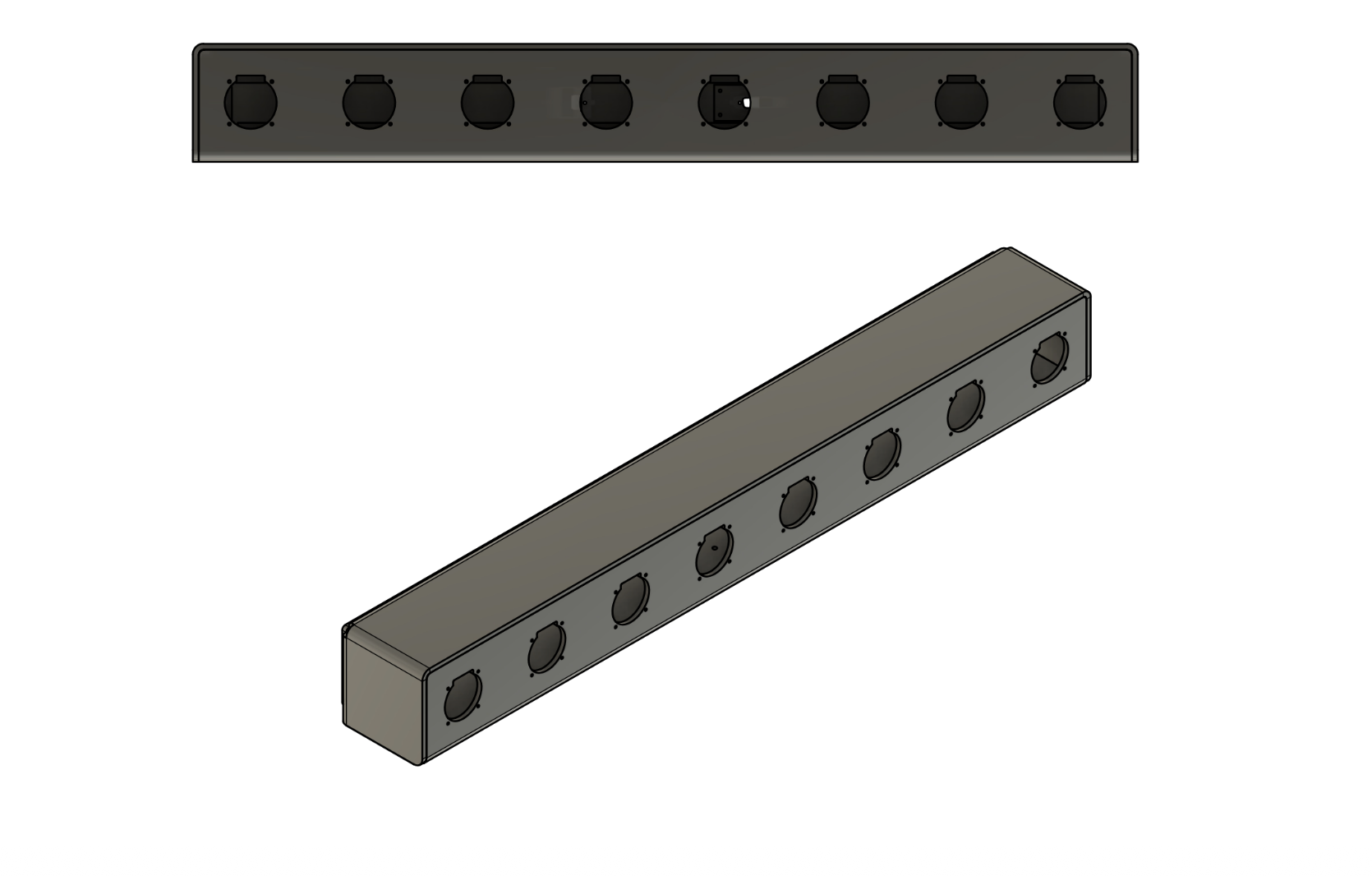
THE AURA is composed of 24 modular speaker units. Each module is one metre long, 12.5 cm high, weighs about 20 lb, and holds eight drivers — eight individual mono emitters. A single module therefore functions as an 8-channel WFS array in its own right. Placing all 24 modules side by side yields the full 192-channel configuration spanning 24 metres.
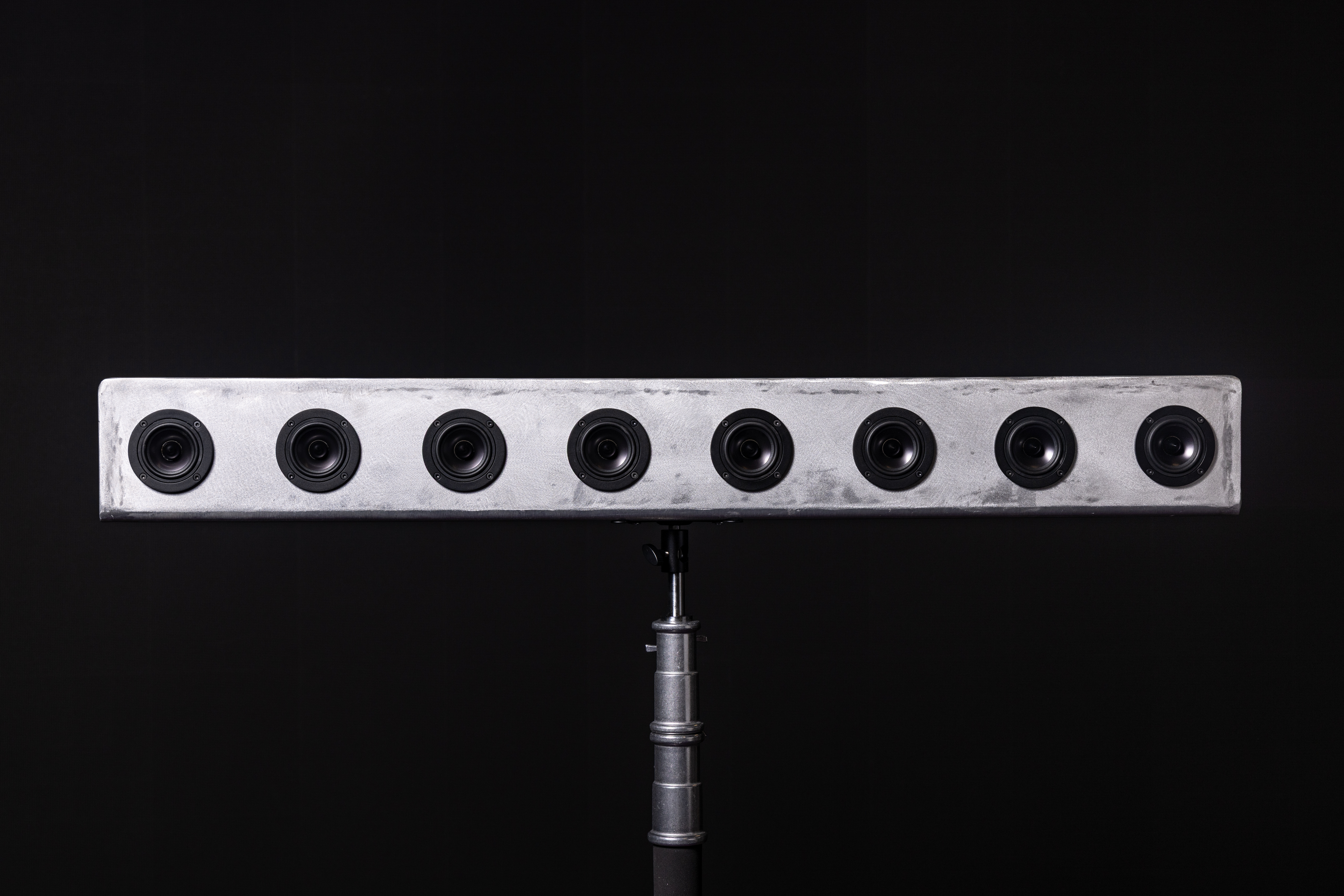
The array is an equidistant linear array: all modules sit on a common axis with uniform spacing, and all drivers are spaced 12.5 cm apart. This spacing fixes the spatial sampling of the aperture and therefore the alias-free band of the 2.5D WFS reconstruction — approximately 1.37 kHz — which preserves the interaural time and level cues the auditory system uses for localisation while retaining usable low-frequency response.
The chosen driver is the 3-inch Dayton Audio RS75-4, a full-range unit with a near-flat response below 10 kHz. Coupled to the aluminium chassis, the low-frequency output is reinforced to compensate for roll-off below 100 Hz, aiding reproduction of sub-bass content without a separate subwoofer in many rooms.
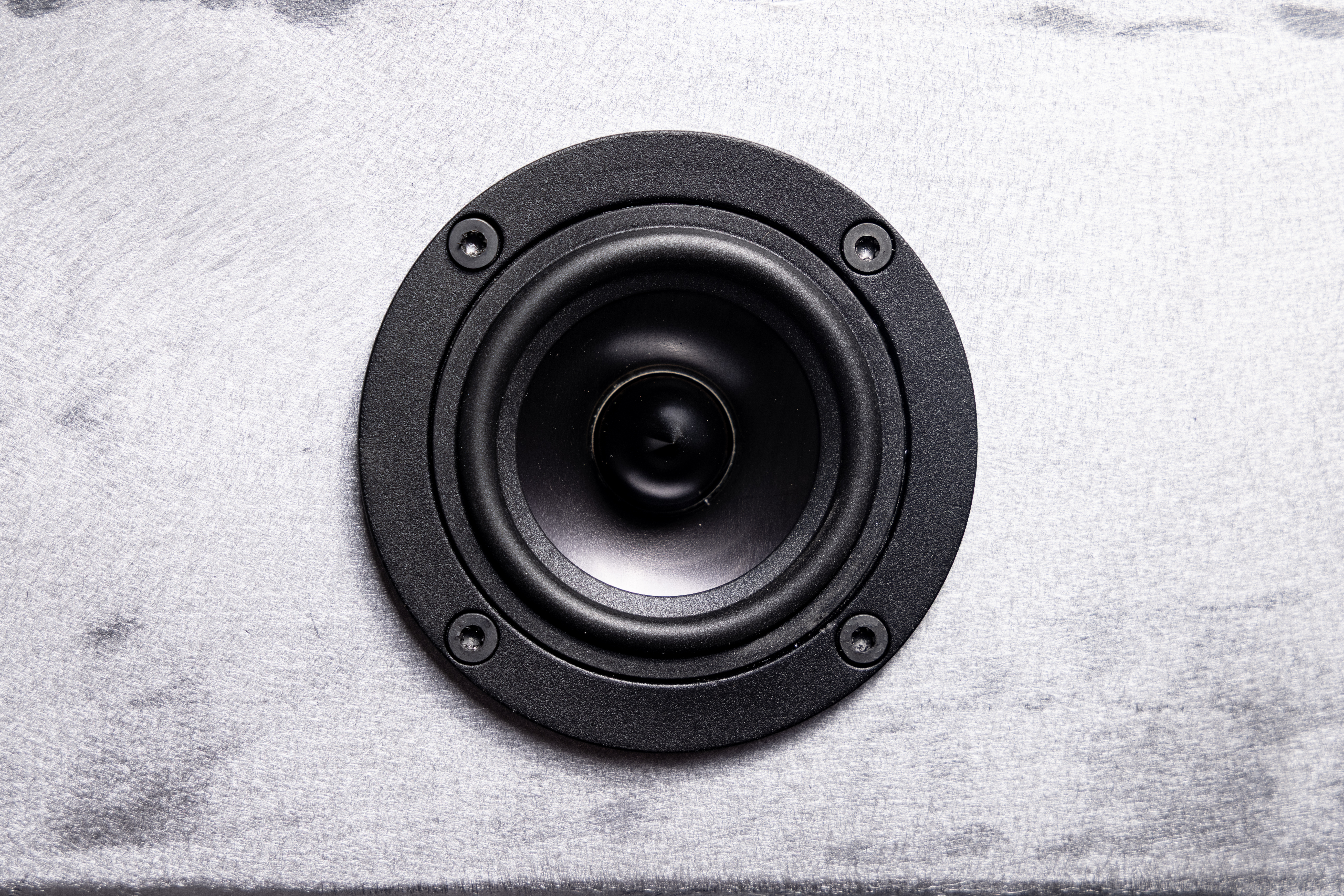
Enclosures are folded from quarter-inch aluminium and welded. Aluminium is unconventional as a loudspeaker material because of its resonant character, but it is chosen here for durability, dimensional stability, and its function as a heat sink for the embedded amplifiers — eliminating the need for vents or active cooling. The low profile lets the array mount along stage edges, risers, or wall reveals and recede visually at distance.
| Parameter | Value |
|---|---|
| Drivers per module | 8 |
| Module length | 1 m |
| Module height | 12.5 cm |
| Module weight | ≈ 20 lb (9 kg) |
| Driver | Dayton Audio RS75-4, 3 in, full-range |
| Driver spacing | 12.5 cm |
| Enclosure | Folded 1/4 in welded aluminium |
| Mounting | VESA mount; light-stand spigot adapter |
| Recommended height | ≈ 1.7 m (standing ear height) |
| Parameter | Value |
|---|---|
| WFS scheme | 2.5D, equidistant linear array |
| Spatial aliasing limit | ≈ 1.37 kHz |
| Full aperture | 24 m (24 modules) |
| Useful projection | to ≈ 20 m in medium rooms |
| Parameter | Value |
|---|---|
| Amplification | 8 × Texas Instruments TPA3110 class-D, on board |
| Power supply | 120 W laptop-style, internal, one per module |
| Signal input | DB-25, TASCAM pinout, 8 balanced line inputs |
| Controls | None (no volume, no power switch) |
| Cooling | Passive; aluminium chassis as heatsink |
| Backbone | MADI (master clock via MADI stream) |
| Sample rate | 48 kHz at full 192 channels |
At 96 kHz the maximum channel count per MADI path halves; 48 kHz is the practical rate for the full 192-channel deployment.
Modules sit on a single axis. Maintain the 12.5 cm driver spacing across module joints as well as within modules so the aperture samples uniformly. Aim modules toward the listening regions and install around 1.7 m for standing audiences.
The array is modular by design. Beyond the full 24 m line, subsets of modules can be deployed, and curved or segmented layouts can follow a room's architecture. See Configurations for recommended layouts.
The array accepts line-level signal from any multichannel interface; the number of modules used can be matched to the channel count an interface provides. The reference backbone is MADI, chosen over Dante/AoIP for fixed low latency, stable clocking, license-free operation, and a simple signal-flow schematic.
The shared clock is carried on the MADI stream, keeping the whole system in a single sync domain with known, low latency.

The architecture scales cleanly. A single M-32 DA drives up to four modules; a single module can be driven from any 8-channel interface using a DB-25-to-TRS or DB-25-to-XLR snake for small-scale tests or partial deployments.
The input connector uses the TASCAM (AES59) analog pinout for 8 balanced line-level channels. Confirm any snake or breakout matches this standard before connection. See Appendix A.
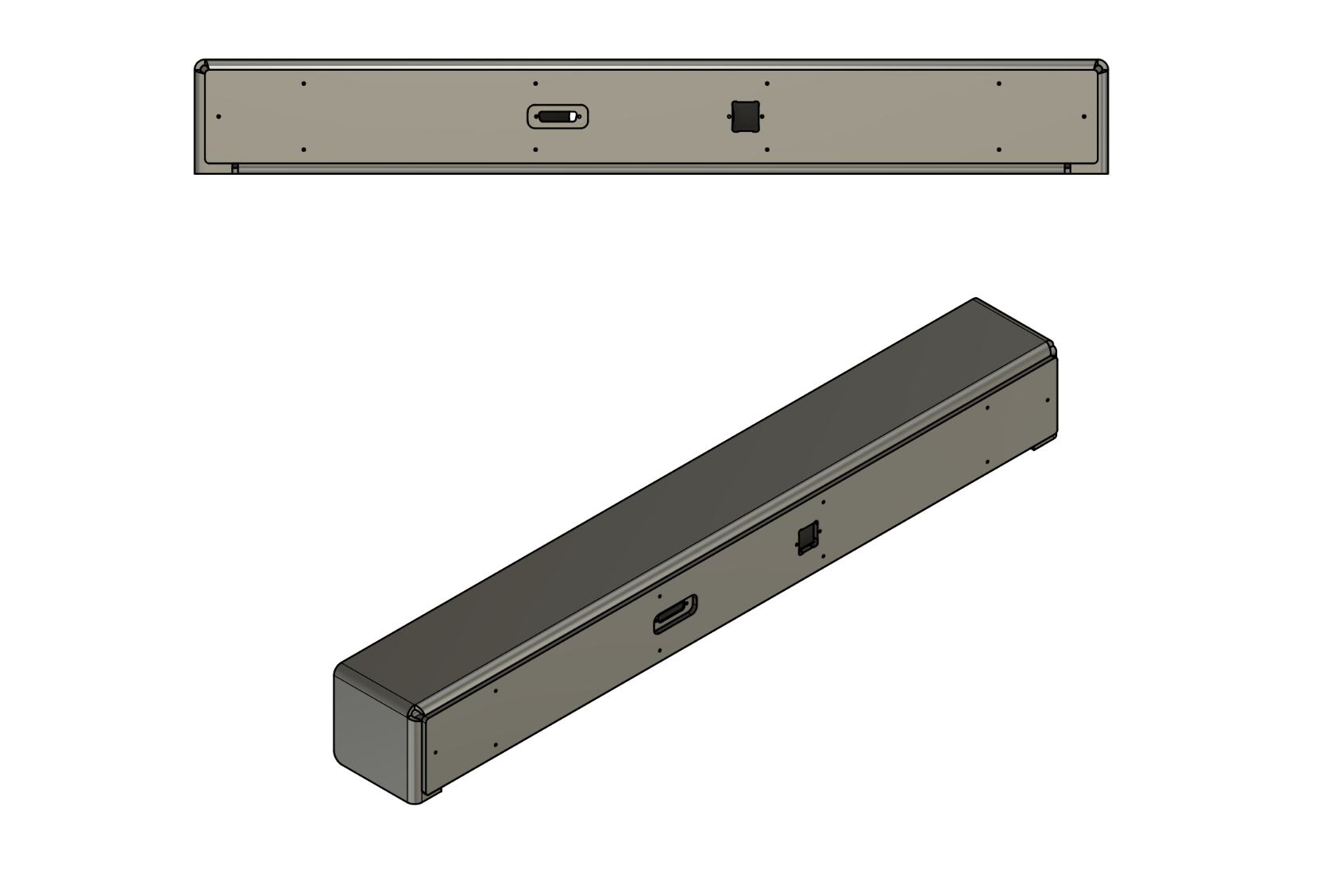
Each module is self-contained: an internal 120 W laptop-style supply feeds the eight on-board amplifier channels. Operation is plug-and-play — connect mains and connect the DB-25 signal cable; there is nothing to switch or set on the module itself. Heat is conducted into the chassis, so the system runs silent without fans.
This is the end-to-end procedure for bringing THE AURA up in a room: mounting the speakers, running the cabling, connecting the converter chain to a computer, and verifying the system before performance. The conceptual topology lives in Signal Flow & Routing; this chapter is the practical checklist.
Seat each DB-25 connector fully and secure its screws. A loose or partially seated DB-25 is the most common cause of grounding artefacts (hum or high-pitched noise) and of whole channel blocks dropping out. See Troubleshooting.
The DSP core is a faithful realisation of Verheijen's formulation of Wave Field Synthesis (Delft, 1997), reduced to a practical horizontal loudspeaker line.
Huygens' principle states that every point on a propagating wavefront acts as a secondary source of spherical wavelets, and the wavefront an instant later is the envelope of those wavelets. WFS turns this into a reproduction method: drive a dense distribution of loudspeakers (secondary sources) arranged around the listening area with the correct amplitude and delay, and their superposition reconstructs, inside that area, the field of a virtual primary source — a wavefront that appears to originate from a point that is not physically there.
Crucially, the synthesised field has the correct curvature: the wavefronts are genuinely spherical (or, for distant sources, planar), so the source localises consistently across a large area rather than at a single sweet spot. This is what distinguishes WFS from amplitude-panning.
The formal basis is the Kirchhoff–Helmholtz integral: the sound pressure anywhere inside a source-free volume is determined by the pressure and its normal gradient on the enclosing surface. Specialising that surface to a plane and discarding one of the two source types (a half-space Green's function) yields the Rayleigh I integral, which expresses the interior field as a distribution of monopole secondary sources on the plane, driven by the normal particle velocity of the target field.
A full planar array is impractical, so WFS uses a horizontal line of loudspeakers at ear height. Reducing the 3-D Rayleigh integral to a 1-D line requires a stationary-phase approximation — the origin of the “2.5-D” character of practical WFS. The reduction is exact only along a chosen reference line (typically the listener line) and introduces two artefacts elsewhere: an amplitude error that grows with distance from the reference line, and a spectral colouration. Both are compensated in the driving function.
For a non-focused monopole virtual source, the secondary-source driving signal Q (Verheijen Eq. 2.27) has the form:
where S(ω) is the source spectrum, k = ω/c is the wavenumber, r is the distance from the virtual source to the secondary source x0, z0 is the source depth behind the array, Δz0 is the reference (listener) distance, and φ is the angle between the source→loudspeaker ray and the array normal. Term by term:
A virtual source can be placed between the array and the listener (a focused source). The required field first converges onto the focus point, then diverges toward the listener. Mathematically this is the time-reversed operator: the focusing driving function carries e+jkr instead of e−jkr (Verheijen §2.3.2). In practice the loudspeakers farthest from the focus must fire first, so all contributions arrive at the focus together.
Focused sources have inherent limits: the reconstruction is valid only for listeners beyond the focus, a real acoustic focus forms in front of the array, and there is unavoidable pre-echo. The energy-concentration gain near the focus is singular as the source approaches the reference line, which is why robust implementations bound it.
Because the loudspeakers sample the wavefield at a finite spacing Δx, the synthesis is exact only below a spatial Nyquist frequency. The wavenumber limit is kx,Nyq = π/Δx, giving a temporal frequency:
Above falias the array cannot correctly reproduce the wavefront and spatial aliasing appears (comb-filtering / phantom images that move with the listener). The mitigation is to band-limit the driving signal at falias, trading high-frequency spatial accuracy for the absence of aliasing. Spacing is decisive: a Δx = 0.125 m array aliases from ≈ 1.37 kHz, whereas an 8 mm array is alias-free to ≈ 21 kHz — effectively the whole audio band.
A real array is finite, so the synthesis integral is truncated at the array ends. The abrupt truncation radiates edge-diffraction waves that smear localisation and add colouration. Verheijen (§2.4.1) compares explicit edge-source compensation against a smooth amplitude taper of the loudspeaker gains toward the ends, and recommends the taper (a cosine / half-Hanning window) as the more robust and efficient choice.
PanWFS is an open-source SuperCollider extension developed alongside THE AURA and compatible with any 2.5D equidistant linear WFS array. It treats WFS authoring as another panning algorithm: define a virtual source position (and, for directional sources, an orientation) and PanWFS synthesises the wavefront by computing per-loudspeaker delay and amplitude from the Rayleigh/Huygens formulation. Doppler shift emerges naturally from changing propagation delays — no separate algorithm is required.
The current release, PanWFS UGens, is a compiled SuperCollider server-plugin: the DSP runs in compiled C++ UGens rather than SuperCollider pseudo-UGens. It provides four classes — two that render onto the array (PanWFS_Monopole, PanWFS_Cardioid) and two for headphone monitoring (PanWFS_Headphone, PanWFS_Binaural) — in one PanWFS.sc class file and one PanWFS.scx plugin. Source and the latest build instructions live at github.com/keremergener/PanWFS.
Building the plugin needs SuperCollider, CMake, a C++ compiler, Git, and the SuperCollider source headers matching your installed SuperCollider version. On macOS:
xcode-select --install
brew install cmake gitThe plugin is built as a Universal binary (arm64 + x86_64), so it runs on both Apple Silicon and Intel Macs without rebuilding — architecture is not a concern. It must, however, match the plugin API version of your installed SuperCollider. If you see API version mismatch — Plugin's API version: 6. Expected: 3., the plugin was built against the wrong headers — clone the SuperCollider source whose tag matches your app, e.g.:
git clone --recursive --branch Version-3.13.0 https://github.com/supercollider/supercollider.gitCreate the extension folders, copy the class file and the compiled plugin, clear the macOS quarantine flag if present, then recompile and reboot:
mkdir -p "$HOME/Library/Application Support/SuperCollider/Extensions/PanWFS/classes"
mkdir -p "$HOME/Library/Application Support/SuperCollider/Extensions/PanWFS/plugins"

# SuperCollider class file
cp ~/PanWFS_RealUGens/PanWFS.sc \
  "$HOME/Library/Application Support/SuperCollider/Extensions/PanWFS/classes/"

# compiled server plugin
cp ~/PanWFS_RealUGens/build/PanWFS.scx \
  "$HOME/Library/Application Support/SuperCollider/Extensions/PanWFS/plugins/"

# clear quarantine if macOS blocks the plugin
xattr -dr com.apple.quarantine \
"$HOME/Library/Application Support/SuperCollider/Extensions/PanWFS/plugins/PanWFS.scx"thisProcess.recompile;
s.quit;
s.boot;Confirm the install by evaluating PanWFS_Monopole in the interpreter. If the language finds the class but the server reports UGen 'PanWFS_Monopole' not installed, the .scx plugin did not load — check that it exists in the plugins folder and reboot the server.
Match the server's output bus count to the array before playing:
s.options.numOutputBusChannels = 8;    // one module
// s.options.numOutputBusChannels = 192; // full array
s.reboot;Positions are given in metres on a Cartesian grid, with the centre of the array as the origin:
virtual_x: negative to the left of centre, positive to the right.virtual_z: positive behind the array (non-focused sources); negative in front (focused sources).The source input must be a single channel of audio.
A WFS monopole (omnidirectional) source for a regular linear loudspeaker array — radiating equally in all directions. It outputs one signal per channel, applying the per-speaker delay and amplitude from the Rayleigh/Huygens formulation, and can place both non-focused (behind the array) and focused (in front of the array) sources.
| Argument | Meaning |
|---|---|
numChans | Number of output channels — one per loudspeaker in the array (first argument). |
input | Mono source signal (1 channel only). |
virtual_x | Source X position (m); 0 = array centre; − toward the left, + toward the right. |
virtual_z | Source Z position (m); + behind the array (non-focused), − in front (focused). |
speaker_distance | Spacing between drivers, in metres. |
zRef | Reference line depth Δz₀ (m); pick near the audience. |
roomTemp | Room temperature (°C) — affects the speed of sound. A thermometer/hygrometer is recommended; a sensor can feed this over OSC. |
humidity | Relative humidity in % (e.g. enter 41 for 41%). |
groundElevation | Elevation above mean sea level (m); negative below sea level. Converted internally to barometric pressure (sea level = 101325 Pa). Set 0 if unknown. |
max_delay | Delay buffer size (s); increase with caution. |
lag | Position smoothing time (s) for source motion: delays and gains glide to new targets, preventing clicks. ~0.02 s typical; 0 disables (may click). |
(
x = {
    var sig;
    sig = SinOsc.ar(220) * 0.1;

    PanWFS_Monopole.ar(
        input: sig,
        virtual_x: MouseX.kr(-1.0, 1.0),
        virtual_z: MouseY.kr(0.2, 4.0),
        8,
        speaker_distance: 0.125,
        zRef: 2,
        roomTemp: 20,
        humidity: 50,
        groundElevation: 0,
        max_delay: 0.5,
        lag: 0.02
    )
}.play;
)
// x.free;A WFS directional source (such as a voice or a human head) with source yaw/directivity control. It behaves like PanWFS_Monopole with an added yaw that sets the source's facing direction, and likewise supports both non-focused and focused sources.
| Argument | Meaning |
|---|---|
numChans | Number of output channels — one per loudspeaker (first argument). |
input | Mono source signal (1 channel only). |
virtual_x | Source X position (m); 0 = array centre; − left, + right. |
virtual_z | Source Z position (m); + behind the array (non-focused), − in front (focused). |
yaw | Source facing direction in radians. −90° (−π/2) faces straight toward the audience, 0° faces stage right (+x), 180° (π) faces stage left (−x). |
speaker_distance | Spacing between drivers, in metres. |
zRef | Reference line depth Δz₀ (m); pick near the audience. |
roomTemp | Room temperature (°C) for the speed of sound; OSC sensor optional. |
humidity | Relative humidity in % (e.g. 41 for 41%). |
groundElevation | Elevation above mean sea level (m); converted to barometric pressure. Set 0 if unknown. |
max_delay | Delay buffer size (s); increase with caution. |
lag | Position smoothing time (s) for source motion: delays and gains glide to new targets, preventing clicks. ~0.02 s typical; 0 disables (may click). |
(
x = {
    var sig;
    sig = Saw.ar(120) * 0.05;

    PanWFS_Cardioid.ar(
        input: sig,
        virtual_x: MouseX.kr(-1.0, 1.0),
        virtual_z: MouseY.kr(0.2, 4.0),
        yaw: MouseX.kr(-pi, pi),
        8,
        speaker_distance: 0.125,
        zRef: 2,
        roomTemp: 20,
        humidity: 50,
        groundElevation: 0,
        max_delay: 0.5,
        lag: 0.02
    )
}.play;
)These let a spatial scene be sketched and previewed on ordinary headphones using the same Cartesian source coordinates as the rendering UGens, so a composition can be drafted away from the room and then rendered on the array unchanged.
A lightweight geometric headphone renderer using interaural delay, distance gain, and simple head-shadow filtering. Because it avoids full HRTF filtering it is low-CPU and portable — ideal for rapid sketching and testing trajectories — though it is not a substitute for individualised binaural realism. With Apple AirPods, the Headitude app can route head-tracking data to headyaw for active listening.
| Argument | Meaning |
|---|---|
input | Mono source signal (1 channel only). |
virtual_x | Source X in PanWFS coordinates; − left of centre, + right. |
virtual_z | Source depth; + behind the loudspeaker line, − in front toward the listener. |
listener_x | Listener X in the same coordinate system, allowing evaluation away from the array centre. |
listener_z | Listener depth; typically negative (e.g. −2 = two metres in front of the line). Do not use positive values — you cannot physically be inside the acousmatic space. |
headyaw | Listener head rotation (radians); 0 faces the array, ± rotates the listening direction. |
headWidth | Assumed distance between the ears (m); scales ITD/ILD and therefore image width and strength. |
distRef | Distance reference factor controlling amplitude vs. distance; prevents excessive loudness at very close range while letting far sources attenuate naturally. |
lag | Position smoothing time (s) for source motion. ~0.02 s typical; 0 disables. |
(
x = {
    var sig;
    sig = PinkNoise.ar(0.05);

    PanWFS_Headphone.ar(
        input: sig,
        virtual_x: MouseX.kr(-2.0, 2.0),
        virtual_z: MouseY.kr(-1.0, 4.0),
        listener_x: 0,
        listener_z: -2,
        headyaw: 0,
        headWidth: 0.18,
        distRef: 1.0,
        lag: 0.02
    )
}.play;
)A lightweight parametric binaural renderer with simple head shadow, pinna-like peak/notch cues, rear dulling, and near-field low-frequency support. It is a translation-oriented preview tool that preserves the spatial intent of a PanWFS scene during composition — not a replacement for the array or an individualised HRTF renderer. As with PanWFS_Headphone, Headitude can drive headyaw from AirPods head-tracking.
| Argument | Meaning |
|---|---|
input | Mono source signal (1 channel only). |
virtual_x | Source X in PanWFS coordinates; − left, + right. |
virtual_z | Source depth; + behind the line, − in front toward the listener. |
listener_x | Listener X in the same coordinate system. |
listener_z | Listener depth; typically negative (e.g. −2). Do not use positive values. |
hrtf | A parametric HRTF settings object (an Event of model parameters: head shadow, spectral emphasis, front/back coloration, distance behaviour, etc.). If nil, internal defaults are used. |
headyaw | Listener head rotation (radians); 0 faces the array. |
(
~hrtf = (
    headWidth: 0.18,        speedOfSound: 343.0,   maxDelay: 0.05,
    lagTime: 0.02,          minDistance: 0.125,    distRef: 1.0,
    shadowFc: 3500,         shadowRs: 1.0,         shadowDb: -10.0,
    lowShelfFc: 250,        lowShelfRs: 1.0,       nearLowBoostDb: 2.0,
    nearRefDistance: 0.6,
    pinnaPeakFcFront: 3200, pinnaPeakFcSide: 4200, pinnaPeakRq: 0.8,
    pinnaPeakDb: 4.0,
    notchFcFront: 8500,     notchFcRear: 6000,     notchRq: 0.45,
    notchDb: -8.0,
    rearHiShelfFc: 5000,    rearHiShelfRs: 1.0,    rearHiShelfDb: -4.0,
    outputGainDb: -3.0
);

x = {
    var sig;
    sig = Dust.ar(8) * 0.2;

    PanWFS_Binaural.ar(
        input: sig,
        virtual_x: MouseX.kr(-2.0, 2.0),
        virtual_z: MouseY.kr(-1.0, 4.0),
        listener_x: 0,
        listener_z: -2,
        hrtf: ~hrtf,
        headyaw: 0
    )
}.play;
)WFS has no single sweet spot, but a 2.5D line array can be amplitude-correct on only one line parallel to the array. zRef sets that depth and acts as an overall loudness compensator for the room. Rule of thumb: about half the room depth, picked near the audience.
Serviceability is built in. The rear cover is removable, exposing the input and power board. Drivers and amplifiers connect on screw terminals rather than solder, so a failed part is swapped in minutes and any fault localises to a single card or driver.
Disconnect mains and allow the supply to discharge before removing the rear cover.
| Symptom | Check |
|---|---|
| No output from a module | Mains connected; DB-25 fully seated; source level present. |
| One channel silent | Driver lead / amp card terminal; swap suspect amp card. |
| High-pitched sound | Grounding issue — check the DB-25 cable and seat it properly. |
| Speakers 5–7 do not work | Grounding issue — check the DB-25 cable and seat it properly. |
| Channels are routed wrong | Check the routing matrix in the TotalMix software. |
| Phasing / comb filtering | Confirm roomTemp, humidity, groundElevation in PanWFS so the speed of sound is correct. |
| Image collapses when moving | Verify uniform driver spacing across module joints; content above the aliasing limit will not localise. |
| Clocking errors / dropouts | Single MADI sync domain; confirm 48 kHz at full channel count. |
| Source too loud / too quiet | Adjust zRef toward half the room depth. |
The module input is a DB-25 connector wired to the TASCAM (AES59) analog standard for eight balanced line-level channels. This is the widely adopted analog DB-25 pinout used by RME, Avid, MOTU, SSL, and others. Pin 13 is not connected.
| Channel | Hot (+) | Cold (−) | Shield / GND | Driver |
|---|---|---|---|---|
| 1 | 24 | 12 | 25 | 1 |
| 2 | 10 | 23 | 11 | 2 |
| 3 | 21 | 9 | 22 | 3 |
| 4 | 7 | 20 | 8 | 4 |
| 5 | 18 | 6 | 19 | 5 |
| 6 | 4 | 17 | 5 | 6 |
| 7 | 15 | 3 | 16 | 7 |
| 8 | 1 | 14 | 2 | 8 |
Pin 13 is unused (no connection). AES/EBU digital DB-25 cables use a different pinout and are not interchangeable with this analog wiring. Source: TASCAM DB-25 pinout standard.
THE AURA in the studio and in performance. Select any image to view it larger; use the arrow keys or the on-screen controls to move between photographs.
Holophonic audio — Reproduction that reconstructs the sound pressure field itself, so virtual sources behave as if in physical space and remain consistent for listeners across the area — communal rather than personalised.
2.5D WFS — A practical reduction of full 3D WFS to a horizontal line of sources, amplitude-correct along a chosen reference line (zRef).
Secondary source — A loudspeaker driven so the superposition of all speakers reconstructs the target (primary) wavefront.
Focused source — A virtual source rendered in front of the array (negative virtual_z), synthesised with a time-reversed phase.
Spatial aliasing limit — The frequency above which driver spacing can no longer sample the wavefront cleanly (≈ 1.37 kHz here).